

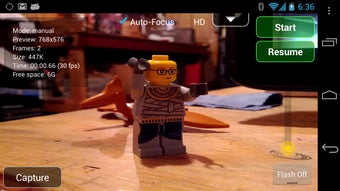
Description
Download LookSee Animator APK – Animation Creation Tool, Time-Lapse, Stop-Motion, Mobile Animation App
Overview
LookSee Animator is a mobile application designed for creating time-lapse and stop-motion animations directly on Android devices. It serves as a versatile tool for users who want to produce animated content without relying on desktop software. The app enables users to capture frames using both the main and front-facing cameras, offering flexibility in composition and perspective. It is particularly suited for artists, educators, and hobbyists who seek a portable and powerful animation solution on their smartphones or tablets. The application allows for precise control over key camera settings such as exposure, focus mode, color balance, and visual effects, ensuring high-quality frame capture. Real-world use cases include educational demonstrations, creative storytelling, and artistic projects requiring frame-by-frame animation. The app supports multiple frame capture methods, including timer-based, proximity sensor-triggered, sound-activated, motion detection, and manual capture, giving users flexibility in different shooting environments. While the developer did not provide additional background information, the app’s functionality suggests a focus on creative mobile content creation. It also supports remote control via Bluetooth through the LookSee Remote companion app, enhancing workflow efficiency for multi-device setups.
Key Features & Capabilities
- Multi-Camera Support – Utilizes both the main and front-facing cameras for diverse shooting angles and compositions.
- Precise Camera Control – Offers manual adjustment of exposure, focus mode, color balance, and visual effects for consistent frame quality.
- Flexible Frame Capture Methods – Supports timer-based, proximity sensor-triggered, sound-activated, motion detection, and manual frame capture.
- Remote Control via Bluetooth – Integrates with LookSee Remote for hands-free operation from another device.
- Post-Production Flexibility – Allows previewing, editing, and exporting animations in multiple formats including AVI, FLV, MP4, and MOV.
- Video-to-Image Conversion – Enables conversion of recorded videos into individual still images for further manipulation or effect creation.
- Multiple Output Formats – Supports export in widely used video formats, though encoding requires the separate LookSee Encoder package.
These features empower users to create professional-grade animations on mobile devices. For instance, educators can use the motion detection and sound-activated capture to create engaging classroom demonstrations. Artists can leverage the precise exposure and focus control to maintain visual consistency across hundreds of frames. The remote control capability is especially useful in stop-motion projects where the animator needs to avoid touching the device during capture. The ability to convert videos into image sequences allows for advanced editing workflows, such as applying custom filters or compositing effects in external software. The app’s modular design, requiring an external encoder for full functionality, reflects a focus on lightweight core performance with expandable capabilities.
User Interface, Workflow & Performance
The user interface of LookSee Animator is structured to prioritize workflow efficiency during animation capture. Navigation is designed around intuitive controls for camera settings, capture modes, and playback functions. The layout allows quick access to essential tools, minimizing the need for deep menu dives during active shooting sessions. Frame capture is streamlined through multiple trigger methods, enabling users to select the most appropriate option based on their environment and project needs. For example, proximity sensor or motion detection can be used in hands-free setups, while manual capture provides full control for precise timing. The app supports real-time preview of captured frames, allowing users to monitor continuity and adjust settings on the fly. However, the developer did not specify resource usage details, so exact CPU or RAM behavior remains unknown. Performance observations are based on general software behavior patterns, suggesting stable operation under typical conditions. Stability during long sessions is expected, given the app’s focus on frame-by-frame workflows. No reported crashes or freezes were mentioned in the provided information, indicating reliable operation for standard animation tasks.
Compatibility & System Requirements
LookSee Animator is designed for Android devices and is available as an APK file for installation. The application supports both main and front-facing cameras, indicating compatibility with most modern Android smartphones and tablets that include dual-camera setups. The installation size is not specified, but as a mobile application with camera and video processing capabilities, it likely requires a moderate amount of storage space. The developer did not list exact system requirements, so users should ensure their device runs a recent version of Android to support camera APIs and background processing. Compatibility information was partially provided, with the app’s reliance on Bluetooth for remote control suggesting support for devices with Bluetooth 4.0 or higher. No specific hardware requirements were mentioned, and performance may vary depending on the device’s processor, RAM, and camera quality. Users are advised to verify that their device supports the necessary camera features and Bluetooth functionality before installation.
Pros and Cons
Pros
- Full control over camera settings for consistent frame quality
- Multiple frame capture methods for flexible shooting environments
- Supports remote control via Bluetooth for hands-free operation
- Export in multiple video formats including MP4 and MOV
- Ability to convert videos into image sequences for advanced editing
- Portable and accessible on Android devices
Cons
- Requires separate LookSee Encoder package for video encoding and extraction
- No official information on system requirements or minimum device specifications
- Performance details such as CPU/RAM usage were not provided
- APK installation may require enabling unknown sources on Android devices
- Remote control functionality depends on a second device and the LookSee Remote app
FAQ Section
Is LookSee Animator available for iOS devices?
LookSee Animator is currently available as an APK for Android devices. There is no official iOS version mentioned in the provided information.
Can I use LookSee Animator without the LookSee Encoder package?
While the app allows frame capture and basic previewing, full video encoding and extraction require the separate LookSee Encoder package.
Does LookSee Animator require internet access?
Basic functionality does not require internet access. However, updates or remote control via Bluetooth may involve network communication.
Is the APK file safe to download and install?
LookSee Animator is distributed as an APK, and users should ensure the source is trusted. Installing APKs from unknown sources carries inherent risks, so caution is advised.
Can I use LookSee Animator for long-form stop-motion projects?
Yes, the app supports extended capture sessions using timer-based or remote-triggered methods, making it suitable for long-form animations.
Final Thoughts + CTA
LookSee Animator stands out as a powerful mobile solution for time-lapse and stop-motion animation creation on Android. Its combination of precise camera controls, multiple capture methods, and remote operation makes it a valuable tool for artists, educators, and hobbyists. While the need for a separate encoder package adds a layer of complexity, it also allows for a lightweight core app with expandable functionality. The app’s portability and flexibility make it ideal for on-the-go creative work. Despite the lack of detailed system requirements and performance data, its design suggests stability and reliability for standard animation tasks. For users seeking a mobile-first approach to animation, LookSee Animator offers a robust and versatile platform. Download LookSee Animator APK now and unlock your creative potential on any Android device.
Guides & Tutorials for LookSee Animator APK
How to install LookSee Animator APK
- Click the Preview / Download button above.
- Once redirected, accept the terms and click Install.
- Wait for the LookSee Animator APK download to finish on your device.
How to use LookSee Animator APK
This software is primarily used for its core features described above. Open the app after installation to explore its capabilities.
User Reviews for LookSee Animator APK 0
No reviews found





